Google Business Profile Playbooks: What does Google recommend?

All of Google's Business Profile best practices in one place, with what's unique to restaurants, hotels, tours, and services called out so you save time.
Google recently published five Google Business Profile optimization playbooks filled with data-backed advice to help local business owners drive more value from their listings. Digital marketing agencies can confidently cite these playbooks to earn buy-in for Google Business Profile (GBP) optimization services.
These guides offer much-needed authoritative insight into tactics that increase public engagement for both general and industry-specific local brand listings. This article highlights key tips and statistics from these guides that — when fully implemented — will increase views, foot traffic, conversions, and sales.
Everything you need to manage your GBP, dominate Google Maps, and attract more customers.
GBP best practices according to Google
Start by reviewing the guidelines for representing your business on Google to gain an understanding of basic eligibility requirements for Google Business Profile listings. This core document also codifies the difference between allowable and forbidden practices.

Once you’ve determined your brand is eligible for inclusion, the new GBP optimization guides will take your listings’ public engagement to the next level. These guides provide advice for local businesses in all categories, as well as unique guides for:
- Restaurants and cafes
- Hotels and accommodations
- Tour and activity operators
- Service-based businesses (e.g., housekeeping services or plumbers)
General businesses
Follow the recommendations in the GBP best practices playbook for general businesses. Need-to-know stats include:
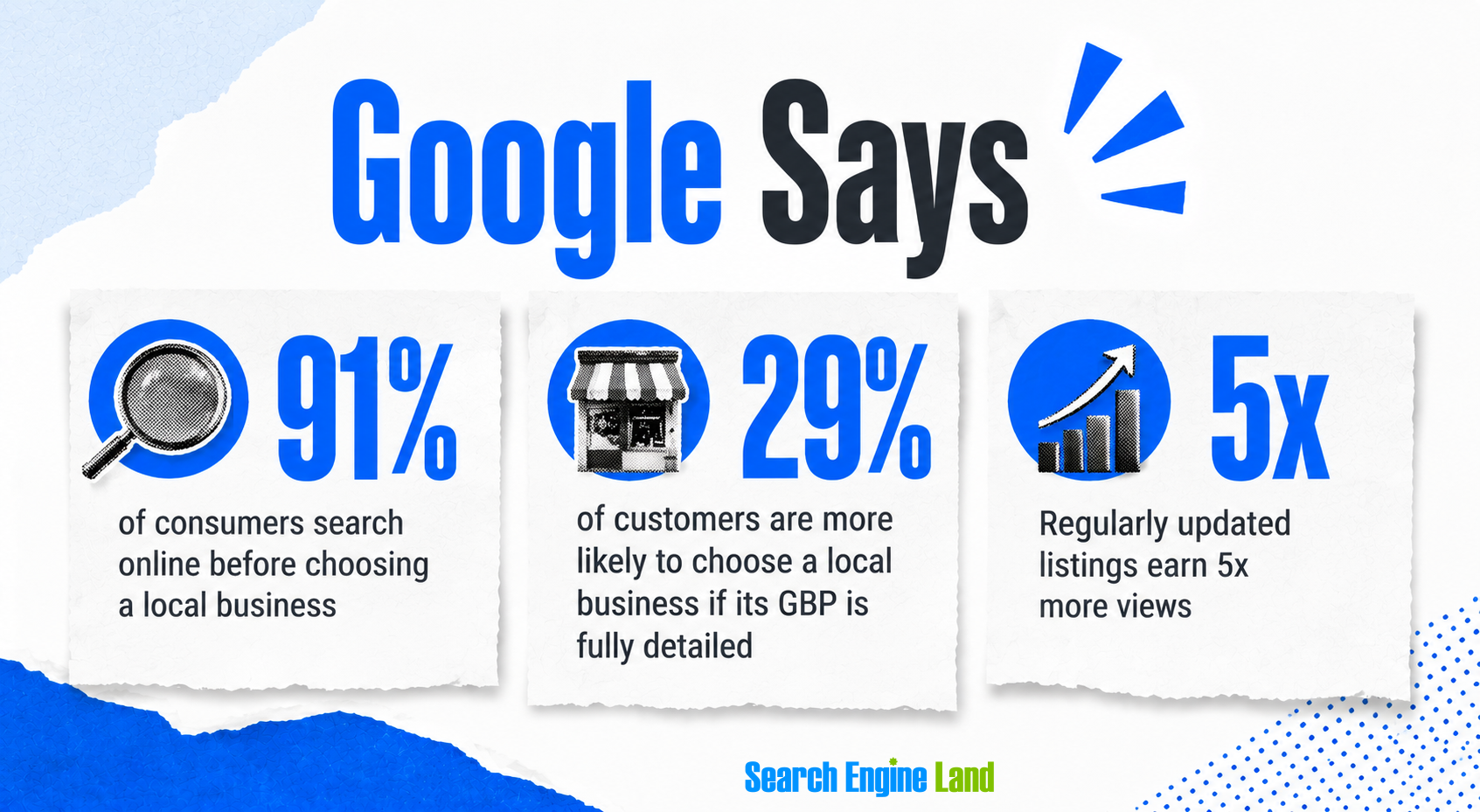
- 91% of consumers search online before choosing a local business
- 29% of customers are more likely to choose a local business if its GBP is completely filled out and detailed
- Regularly updated Google Business Profile listings earn five times more views
Use these data points and tactics to inspire team members and clients to increase their focus on GBP management:
Business information
In 2024, Google facilitated over 2 billion direct connections between the public and local brands across more than 19 million US-based businesses. Complete Google Business Profiles drive results, including:
- Seven times more clicks on different features of your listing, such as driving directions, click-to-call buttons, and links to your website
- Making 29% of the public more likely to consider purchasing from you
- Five times more views of your listing when fields like Google Posts or photos are regularly updated
Business category
Selecting the proper categories for your business is key to appearing in relevant searches. Use your primary category to describe your core business identity, and choose up to nine secondary categories to create a more complete picture of everything your brand offers.
The Whitespark Local Search Ranking Factors report indicates that a proper primary GBP category is the number one local pack and Google Maps ranking factor. Use a free Chrome extension like GMBSpy to research how nearby competitors categorize themselves. This will help you choose the most impactful primary and secondary categories for your business.
Business description
Write your own or use the Google AI-suggested business description generated from the details of your profile and website. Google provides in-depth instructions for AI-generated descriptions.
A strong description instills trust in potential customers by describing what the business is and does. It can also showcase your unique value proposition (UVP), highlighting what sets your brand apart from the local competition. Persuasive UVPs include additional staff, more experience, a convenient location, a wider selection of products and services, awards and accreditations, or lower prices than competitors.
Business hours
Accurate business hours build trust. With 91% of the public searching online before visiting real-world businesses, it’s vital to accurately list when a location is open or closed. Approximately 96% of consumers are more likely to visit a business that displays hours. Set accurate hours on your listings, as well as holiday and special hours.
Hours of operation can be a competitive difference maker. Local pack and Maps rankings adjust throughout the day to reflect which locations are open. Research the open hours of top nearby competitors to identify opportunities where you can be open for business when others are closed.
Set your service area
Service area businesses (SABs) travel to their clients rather than operating out of a location that customers visit. A mobile notary is one example.
Hybrid businesses offer both on-site and remote service, such as a pizza restaurant with both in-house dining and delivery. Make use of the following tips from Google’s documentation if you’re marketing an SAB or hybrid model:
- You can have up to 20 service areas
- The boundaries of your service area shouldn’t be more than two hours drive time from where your business is based
- Be as specific and accurate as possible when setting your service area
Add business attributes
Add as many relevant attributes as possible to your GBP. Attributes include labels like “pet-friendly,” “outdoor seating,” and “WiFi.” These details surface directly in Google’s local results and help customers with specific intents identify a business that can meet their needs.
Increased consumer usage of conversational AI tools like Google AI Mode and ChatGPT is creating new expectations. The public is getting accustomed to accessing highly detailed information about local businesses. For example, a user can prompt AI with a hyper-specific question like, “Where can I find a pet-friendly restaurant with outdoor seating and WiFi for lunch today?”
Choosing as many applicable GBP attributes as possible gives Google maximum details about the brand and location so that the listing can surface as a relevant answer in both traditional search results and AI environments.
Add photos and videos
Images and videos increase listing engagement, drive conversions, and are a key source of GBP freshness. About 90% of consumers are more likely to visit a business with photos on its GBP. Photos drive 42% more requests for directions and 35% more clicks to the website.
Adhere to Google’s photo and video guidelines. Photograph and film every aspect of your business, including:
- Interior and exterior premises
- Amenities such as available parking and restrooms
- ADA access
- Uniformed staff and company vehicles
- Staff at work
- Popular products and “shelfie” inventory
- Holiday displays
- Best reviews turned into graphics
- Customer testimonials captured on video
Create Google Posts
Google Posts are like a microblog hosted on a GBP. They enable business owners to continuously update their listing with fresh content. Crate & Barrel saw a more than 31% increase in Google Maps views, an over 6% increase in Google search views, increased foot traffic, and more conversions by committing to a Google Post publishing schedule.
Adhere to Google Post guidelines. Experiment with all three post types (updates, events, and offers) to determine which formats drive the best results. Include images in your posts and dates when offers are time limited. Some of the largest brands in the US still ignore the power of Google Posts to drive sales. Publishing at least once per week (more often is better) can make a competitive difference.
Add social links
Google now pulls social media content directly into GBPs. Connect your socials to your listing to provide consumers with more influential context about your brand. Prioritize Facebook, Instagram, X, and YouTube.
Approximately 20% of consumers check social media before visiting a nearby business. Painting with a Twist saw over a 9% lift in impressions and a more than 10% rise in clicks to their site from GBPs and clicks-to-call by connecting their social channels to their GBPs.
Add chat (WhatsApp and text)
Increase GBP-based communications by adding chat to your listings. About 60% of consumers prefer using WhatsApp to interact with a business, while 67% would rather message a business than call or email it.
Manage and respond to reviews
Responding to both positive and negative reviews builds consumer trust. A good 91% of the public reads reviews to evaluate local businesses, and 65% are more likely to choose businesses that respond to their reviews via the owner response function.
Google’s guides recommend using their QR code generator on assets like menus, receipts, and storefront windows to drive more reviews. However, this is one area of the guides that is controversial. Reputation Arm founder Claudia Tomina sparked local SEO conversation with her theory that linking QR codes directly to Google Business Profile reviews may result in review suppression (i.e., reviews getting filtered out instead of published).
Tomina theorizes that Google finds it suspicious when users go directly to the reviews section of a GBP without any prior history of searching for that business. She recommends the workaround of linking QR codes to Google Place IDs so that scanning the code causes the customer to essentially perform a branded search for the business before leaving a review. This is, of course, speculative, but it’s important information to know before implementing QR codes for a local business.
Account management and support
Google closes out its general business guide with tips for successful ongoing GBP management. They recommend the following processes:
- Verify your profile: In order to edit your GBP or interact with your customers, you must first verify ownership of the profile. Google will assign one of five verification methods, and the review of your verification request can take up to five days. Video verification tends to result in the most stumbling blocks for business owners. Ex-Googler Brad Wetherall offers an excellent step-by-step tutorial for successful video verification.
- Get help when you need it: It’s simply a fact that things can go wrong with Google Business Profiles.
- For FAQs, the Google Business Profile Help Center often provides the fastest answers.
- Your second-speediest resource is the AI chat function associated with the Help Center (if it is available in your country).
- If you haven’t found the answer you need, use the ”Contact Us” form to directly contact Google with a description of your problem.
- Finally, if none of these options lead to a successful resolution, you can reach out for additional help from the volunteer Product Experts (PEs) in the Google Business Profile Help Community Forum. PEs have the power to escalate complex problems to Google’s staff.
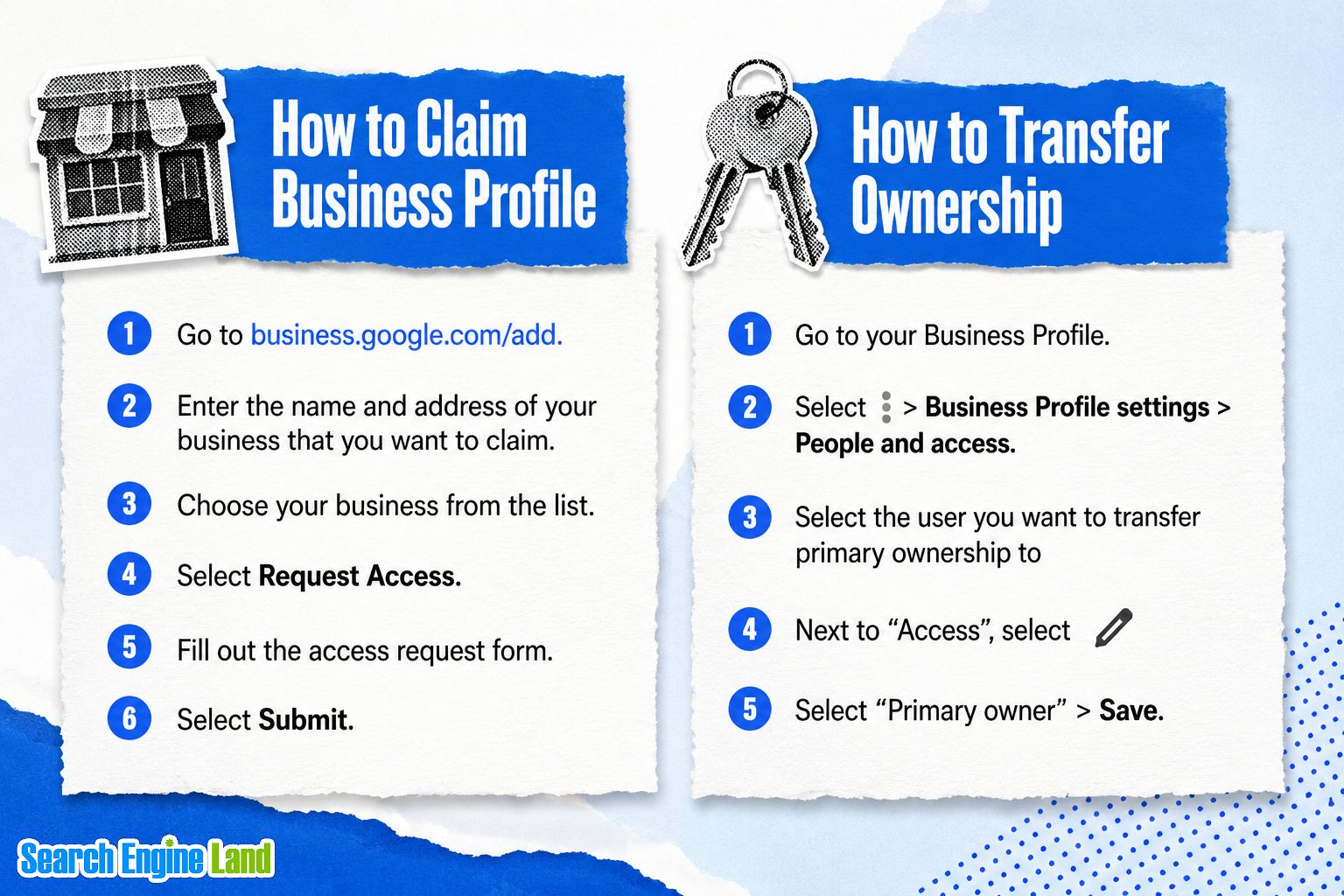
- Claim and transfer ownership: If you need to claim a pre-existing profile controlled by someone else or transfer profile ownership, Google offers the following workflows:
- How to claim a Google Business Profile: Go to business.google.com/add > Enter your business name and address > Select your business from the list > Click “Request Access” > Fill out the access request form > Click “Submit”
- How to transfer ownership: Go to your GBP > Click “Business Profile settings” > Click “People and access” > Select the user primary ownership should transfer to > Select the pencil icon next to “Access” > Choose “Primary owner” > Click “Save”
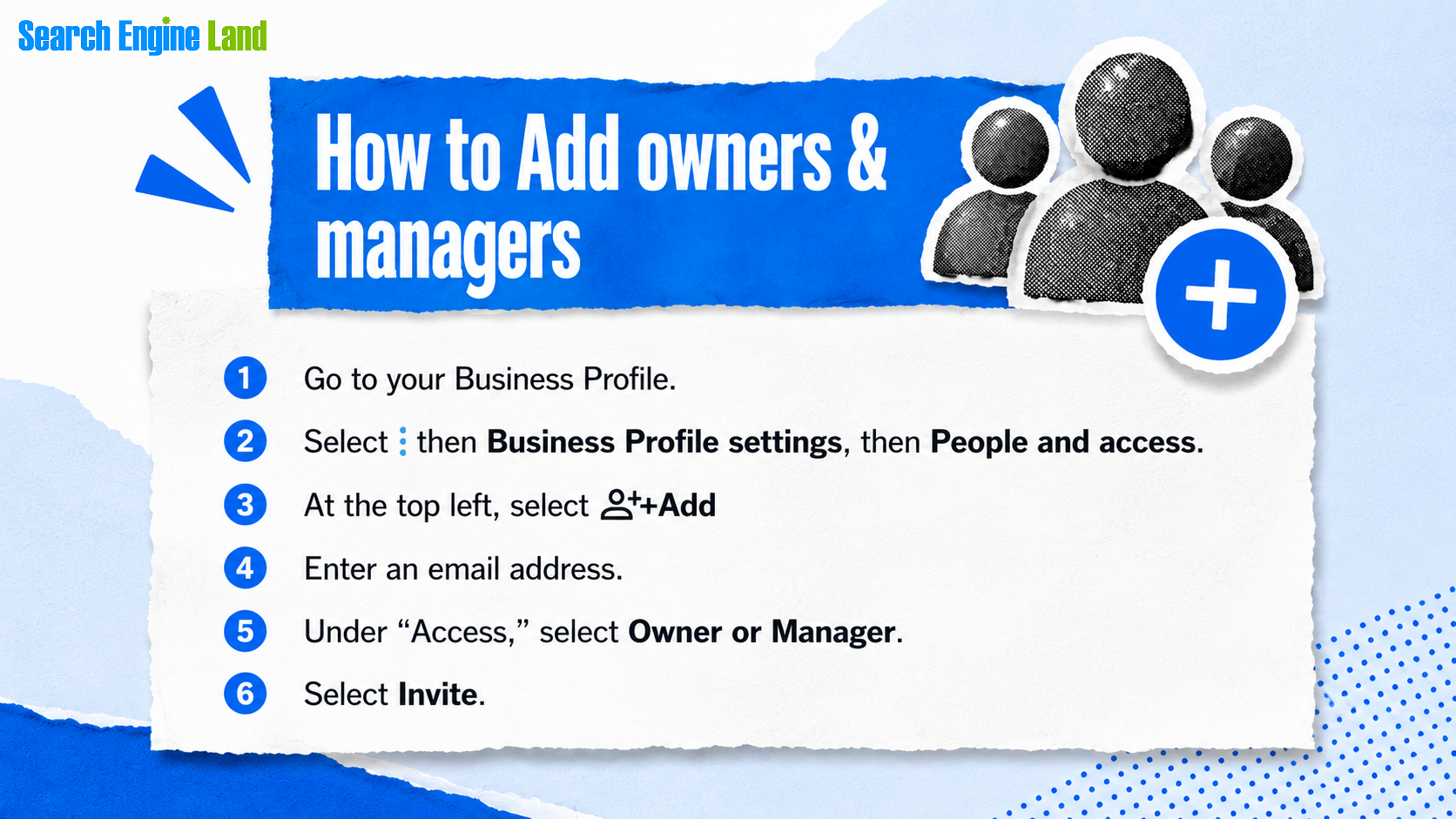
- Add multiple managers: Protect the local brands you market from getting locked out of their listings by adding multiple managers. Having multiple managers allows brands to maintain control of their GBPs when a staff member or third-party marketer leaves. Google offers the following workflow for adding multiple managers:
Don’t forget to regularly review the list of managers. This ensures former staff no longer have access, preventing potential bad actors from engaging in negative behaviors with the brand’s GBPs. - Troubleshooting reference: Finally, Google’s guide offers this helpful table of issue-based troubleshooting links:
| Issue | Resolution |
| Lost access to GBP login | File a ticket here |
| Google Business Profile verification | Support article here |
| Duplicate listing | File a ticket here |
| GBP suspended | Raise a reinstatement request here |
| My profile has been hacked | File a ticket here |
| Incorrect phone number listed on GBP | File a ticket here |
| Fake reviews on your GBP listing | Before you flag a review, check our content policy and criteria specific to reviews. Reporting a review will not guarantee it will be removed from your listing. You can flag a review by following these steps in your Google Business Profile |
| Review extortion | Report here |


Comments
Post a Comment